Softonic review

A Free and Convenient Extension for Chrome

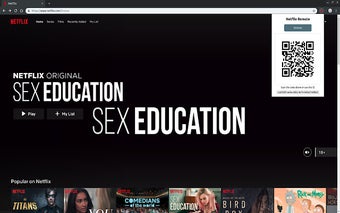
Netflix is one of the largest streaming services in the world. If you are one who likes to binge-watch on the site, this application might just make your streaming experience smoother and better. The Netflix Remote is a useful extension for Chrome that allows you to control your stream on your browser through your mobile.

Here's how it works:

  1. Download the extension by clicking "Add to Chrome".
  2. Open Netflix.
  3. Click on the Netflix Remote extension icon. It will create a code for you to scan.
  4. On your phone, go to https://bit.ly/nflx-rm or https://butttons.github.io/netflix-remote/.
  5. Scan the generated QR code or input the ID indicated in the extension.
 0/1

App specs

  • License

    Free

  • Version

    1.1

  • Latest update

  • Platform

    chrome

  • Language

    English

  • Downloads

    10

  • Developer

Program available in other languages


User reviews about Netflix Remote

Have you tried Netflix Remote? Be the first to leave your opinion!

Add review

Top extensions for Google Chrome

Top downloads Add-ons & Tools for Google Chrome

Top downloads Add-ons & Tools for Google Chrome

Top downloads Add-ons & Tools for Google Chrome

Related topics about Netflix Remote

You may also like

Explore Apps

Latest articles

Laws concerning the use of this software vary from country to country. We do not encourage or condone the use of this program if it is in violation of these laws.